You've heard AI can help your business. You've probably also noticed that most explanations assume you already speak the language. This guide assumes nothing. If you run a business and you can read a memo, you can read this. Every technical term gets defined the moment it appears, and there's a short glossary at the end you can keep in your back pocket.
The AI systems out there
A handful of companies build the large AI systems everything else runs on. These systems are called models. Think of a model as the engine: the part that reads, reasons, and writes. You don't buy the engine directly; you use products and services built on top of it.
The names you'll hear most:
- Anthropic (Claude): builds the Claude family of models, known for careful, reliable work on long and complex tasks.
- OpenAI (ChatGPT / GPT): makes the GPT models behind ChatGPT, the product that introduced most of the world to modern AI.
- Google (Gemini): builds the Gemini models and weaves them into the Google products many businesses already use.
- Meta (Llama): releases its Llama models openly, so companies can run them on their own computers rather than renting access.
- xAI (Grok): builds the Grok models, tied closely to X (formerly Twitter).
Two things worth knowing. First, these companies leapfrog each other constantly: whoever is "best" changes every few months, which is a good argument for not welding your business to any single one. Second, different models have different strengths and prices, and a well-built AI operation uses more than one: the expensive heavyweight for judgment calls, cheaper ones for routine work. More on that in the cost section.
The command interface: why we deploy into Slack or Teams
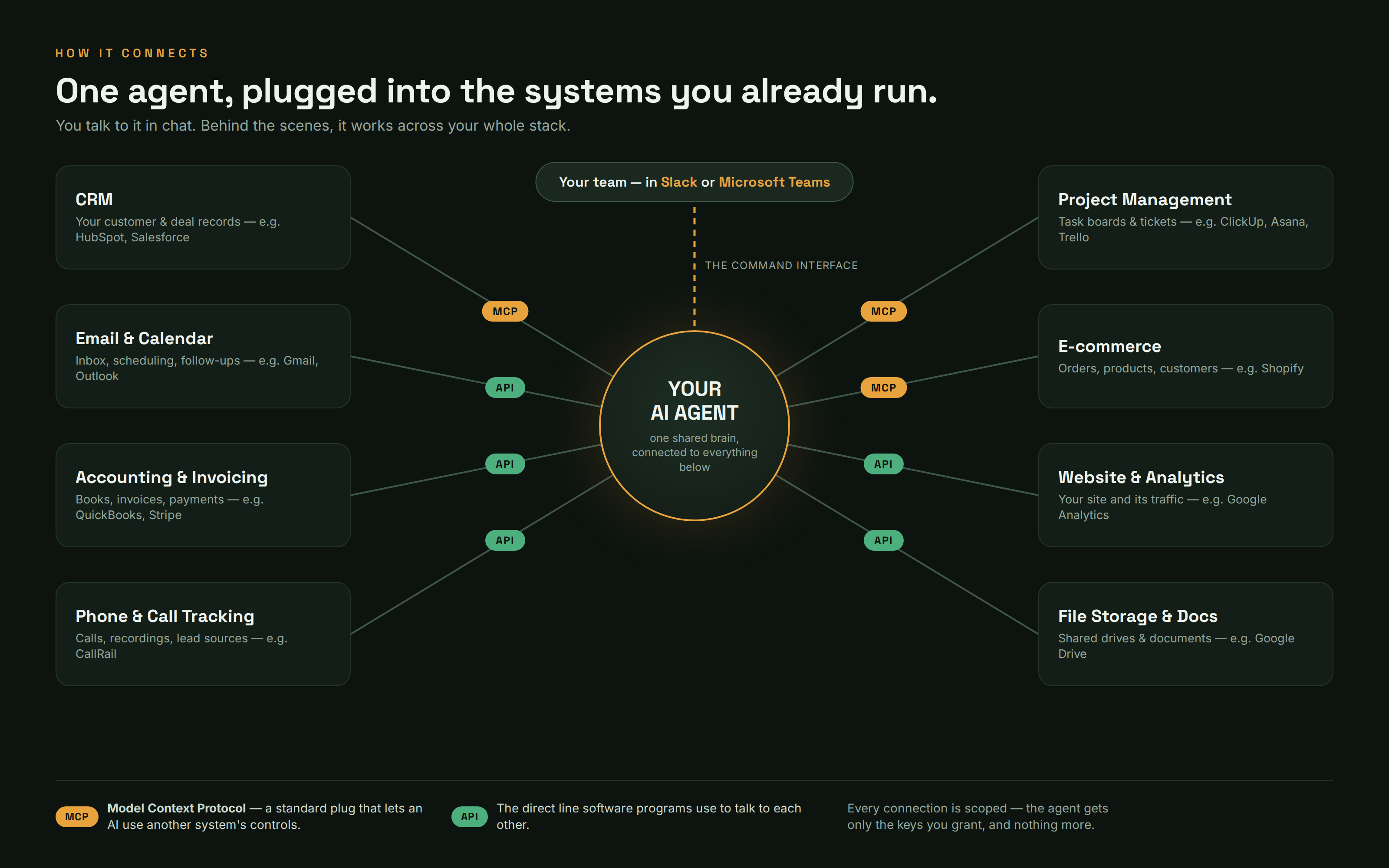
When we set up an AI assistant for a business, we don't hand everyone a ChatGPT login. We put the assistant inside Slack or Microsoft Teams, the group-chat tools where your team already talks, so it works like a coworker you can message. The difference matters more than it sounds. With individual AI logins, every conversation is trapped in one person's private chat tab: nobody else sees what was asked, what was answered, or what was learned, and when that person is on vacation, their AI conversations go with them. Inside your team chat, the assistant is one shared brain the whole company can see and use. Work happens in the open, in the same channels where your team already collaborates. Anyone can watch a request get handled, chime in, or pick up where a colleague left off. There's no new tool to learn and no per-person account to manage: you message the assistant the way you'd message a colleague, and it answers with the full context of everything the business has taught it.
Playing nicely with the systems you already run
An AI assistant that can only chat is a novelty. The real value shows up when it's connected to the systems your business already runs, and that's plumbing work, done behind the scenes.
Most businesses run on the same handful of systems: a CRM (customer relationship management software: the database of your customers and deals, like HubSpot or Salesforce), email and calendars, accounting software like QuickBooks, a phone or call-tracking service, a project board like ClickUp, Asana, or Trello, and maybe an online store like Shopify. Today's AI assistants can be plugged into all of them.
There are two main kinds of plumbing:
- MCP (Model Context Protocol): a standard plug that lets an AI use another system's controls. Before MCP, every AI-to-software connection was custom-built, like needing a different power outlet for every appliance. MCP is the standardized wall socket: software makers publish an MCP connection for their product, and any AI that speaks the standard can plug in. It's a young standard, and support is spreading quickly across the software industry.
- APIs (application programming interfaces): the direct lines software programs have used to talk to each other for decades. An API is a service's official back door for other programs: a defined way to ask "give me this customer's invoices" or "create this task" without a human clicking through screens. Where no MCP plug exists yet, the assistant uses the system's API directly, and mature business software almost always has one.
Some platforms also offer direct integrations: pre-built connections maintained by the vendors themselves. In practice, an implementation uses whichever pipe is best for each system.
The result, whichever pipes are used: you ask a question in chat, and the assistant pulls the answer from the actual systems, your real calendar, your real books, your real customer records, rather than guessing from memory. It can also act on those systems, within limits you set (that's the governance section, below).
Agents: AI with a job
A chatbot answers questions. An agent is something more: an AI with a job, tools, and standing instructions, that does work rather than just talking about work.
The distinction is the difference between a very well-read consultant and an employee. Ask a chatbot "how should I follow up on this lead?" and it gives you advice. An agent does the follow-up: looks the lead up in your CRM, checks the history, drafts the email, and, if you've authorized it, files the task, updates the record, and reports back when it's done. It can be given assignments, it can work while you're not watching, and it remembers what happened yesterday.
If you take one idea from this guide, take this one: modern business AI isn't a smarter search box. It's a new kind of worker, and like any worker it needs a role, rules, tools, and supervision.
What's inside an agent
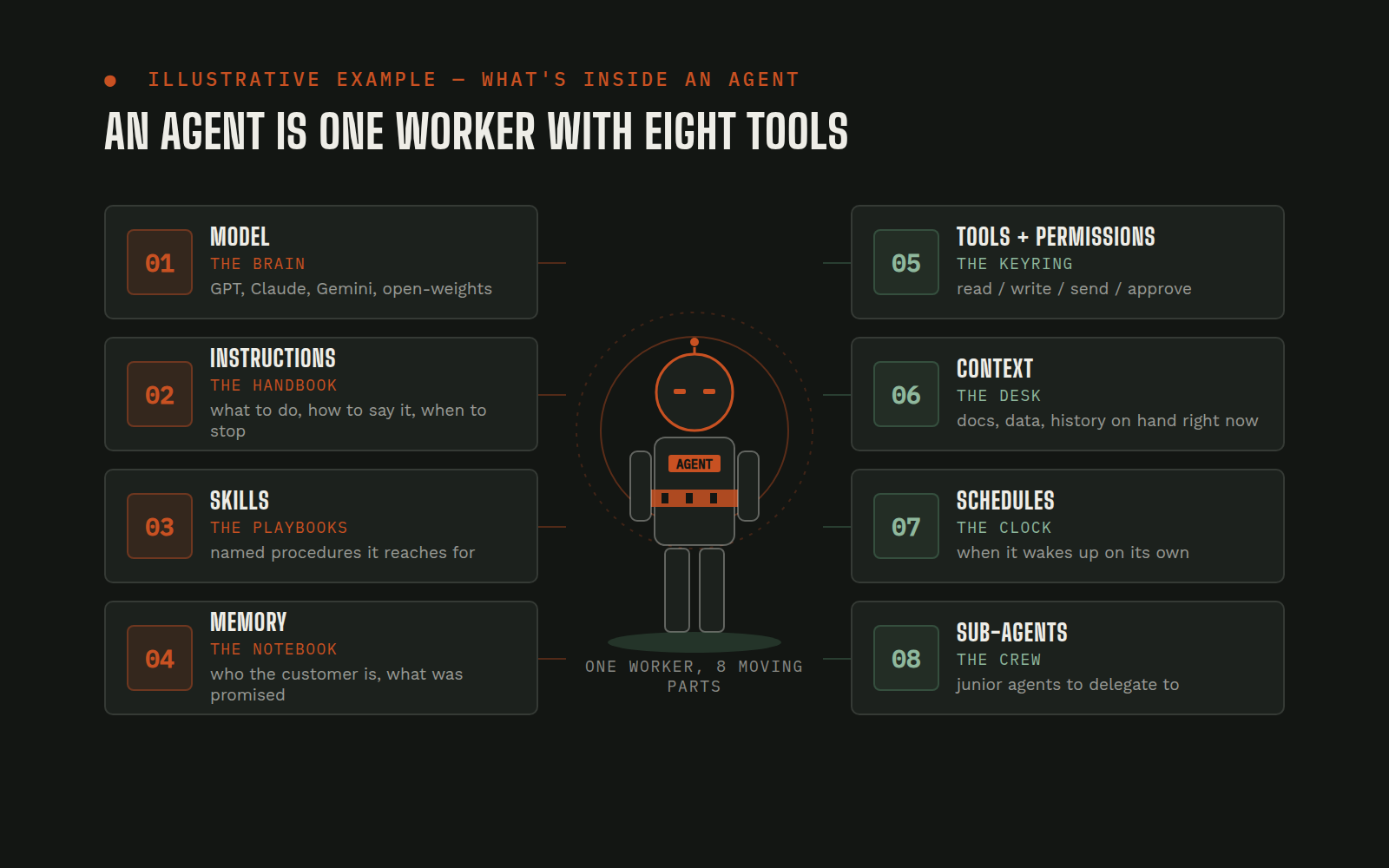
If an agent is a worker, here's the anatomy: what each part is, in plain terms, and why it matters to you as the owner.
The model: the brain. Every agent runs on one of the models from section 1. The model provides raw intelligence: reading, reasoning, writing. Everything else on this list is what turns raw intelligence into a useful employee. Agents can also switch brains, using a top-shelf model for hard judgment and a cheaper one for routine chores.
Instructions: the employee handbook. Standing rules for how the agent operates, written in plain language: what it's for, what tone to use, what it must never do, when to ask a human. Good instructions read like a good handbook, and like a handbook, they get amended as lessons are learned.
Skills: the playbooks. A skill is a learned, step-by-step procedure for a repeatable job: "how we onboard a client," "how we run a monthly report," "how we publish a page." Once a procedure is captured as a skill, the agent performs it the same way every time, and when the process improves, you update the playbook once instead of retraining people. Skills are where an agent stops being generically smart and starts being your operation's expert.
Memory: what it retains. Out of the box, AI models forget everything between conversations. Agents fix this with written memory, and it works a lot like yours: daily notes (a running log of what happened today, decisions made, tasks finished, problems hit) and long-term memory (the distilled, curated stuff worth keeping: how your business works, who's who, lessons learned). Because this memory is written down in files rather than trapped in the AI's head, it survives restarts, can be reviewed by a human, and can be corrected when it's wrong.
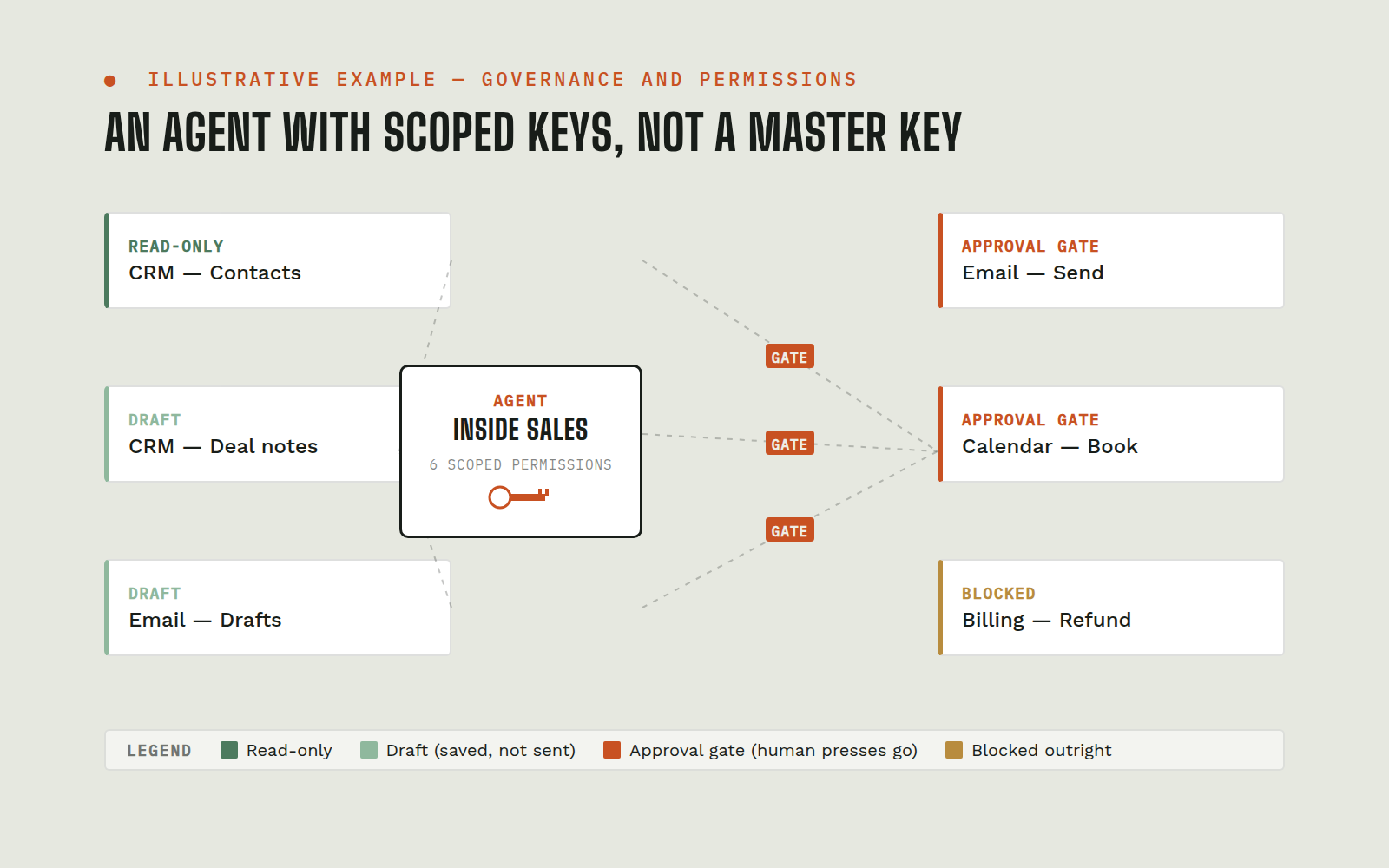
Tools and permissions: the keys. A tool is a specific ability: read email, send email, edit the website, query the CRM, run a report. Crucially, every tool is granted, not assumed: an agent has exactly the keys you give it and no others. You can give it read-only access to the books but no ability to move money; the ability to draft customer emails but not send them. Permissions are the single most important safety lever you have.
Context: what it can see right now. At any given moment, the agent is working with a window of information: your message, the relevant files, recent conversation. That window is called context, and it's finite, like a desk that only fits so many open folders. Well-run agents keep the desk tidy, pulling in what the task needs and filing away what it doesn't. (Context also costs money to carry, see the cost section.)
Scheduled and background work: the night shift. Agents don't only respond when spoken to. They can run on schedules and timers: a heartbeat wakes the agent periodically to check on things, an inbox, a deadline, a pending approval, the way a night watchman does rounds. A watchdog is a narrower sentry that monitors one specific thing and raises an alarm when it drifts (a cost spike, a broken link, a form that stopped submitting). This is how "nobody was watching over the weekend" stops being a failure mode.
Sub-agents: delegation. For big jobs, an agent can spin up helper agents, hand each a piece of the work, and review what comes back, a foreman with a crew. This keeps the main agent's desk clear and lets independent pieces of work run at the same time. The foreman remains accountable: work from the crew gets checked before it counts as done.
None of these parts is exotic on its own. The craft of implementation is assembling them, the right brain, tight instructions, honest memory, minimal keys, sensible schedules, into a worker your team actually trusts.
The three levels of workflow automation
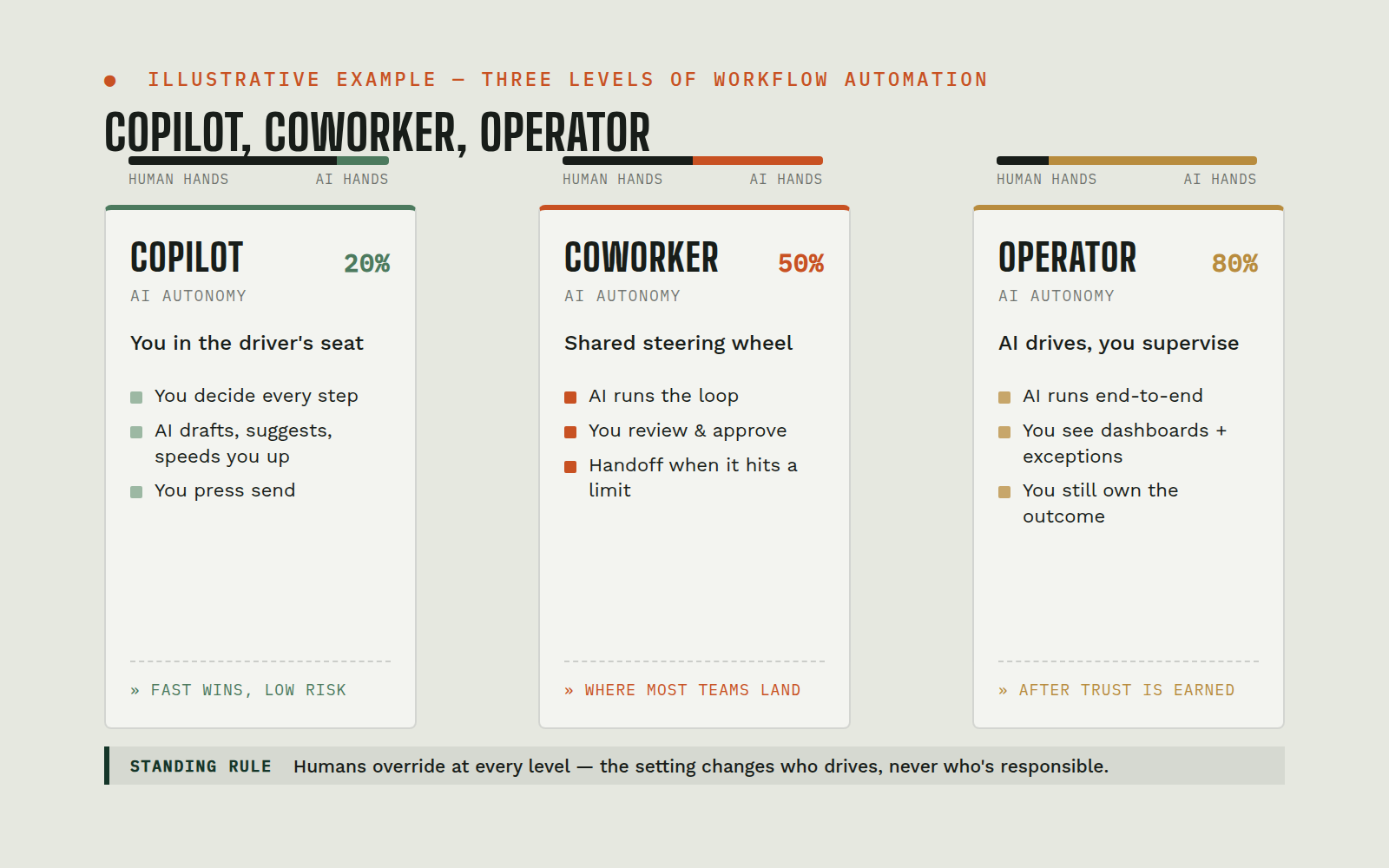
Not every job should be automated to the same degree, so we describe every workflow at one of three levels. (These are the same three levels used across our published use cases, same names, same meanings.)
Copilot: Helps a person work faster. You ask, it answers. All actions belong to a human.
The AI is a brilliant assistant, and a person drives. Examples from live workflows:
- A team member drops a recorded call into chat and gets back clean, filed meeting notes in minutes, decisions, owners, deadlines, instead of someone re-listening to the recording.
- An owner asks "how is this account actually doing?" and the assistant pulls real numbers from the analytics, advertising, and CRM systems on the spot, no logging into four dashboards, no numbers from memory.
- Sales asks for a branded one-pager and receives a polished, on-brand, fact-checked document the same conversation, instead of waiting in a designer's queue.
Coworker: Takes assignments and reports back. You hand it work, it prepares and returns a result.
You delegate a whole task; the AI completes it and shows its work. Examples:
- A website-edit ticket ("update the fee list," "add holiday hours") is assigned on the project board; the agent makes the change, verifies it on the live site, and posts proof, before-and-after screenshots, back on the ticket.
- One chat message becomes a fully built task: the agent reads "get this scheduled for the client," creates the task in the project tool, fills in the brief, and assigns the right person.
- A whole website build or platform migration runs as an assignment: the agent drives the build, then independently inspects every page of the live result, never taking the builder's word for it, before reporting done.
Operator: Owns a workflow end to end, running the process inside the authority you set.
The AI runs the process itself, on a schedule or continuously, and escalates to humans at the moments you've defined. Examples:
- A monitor watches the cancellation inbox around the clock; when a "we're leaving" email arrives, it assembles the client's full history, alerts the team, and drafts a save-the-relationship reply, which a human reviews and decides whether to send.
- An agent does rounds through the day, inbox, calendar, follow-up list, surfacing anything time-sensitive so nothing ages silently over a weekend.
- Every new lead is scored as it arrives and conversion tracking fires automatically, so the advertising platform learns which clicks produce real customers, not just form fills.
The levels are a ladder, and most businesses climb it: start with Copilot work where a human owns every action, graduate proven workflows to Coworker, and reserve Operator for processes where the rules of engagement are crisp and the escalation points are well defined.
What it costs, and where the money actually goes
No two implementations cost the same, so this section explains the shape of AI costs rather than quoting figures. Once you understand the shape, vendor conversations get much easier.
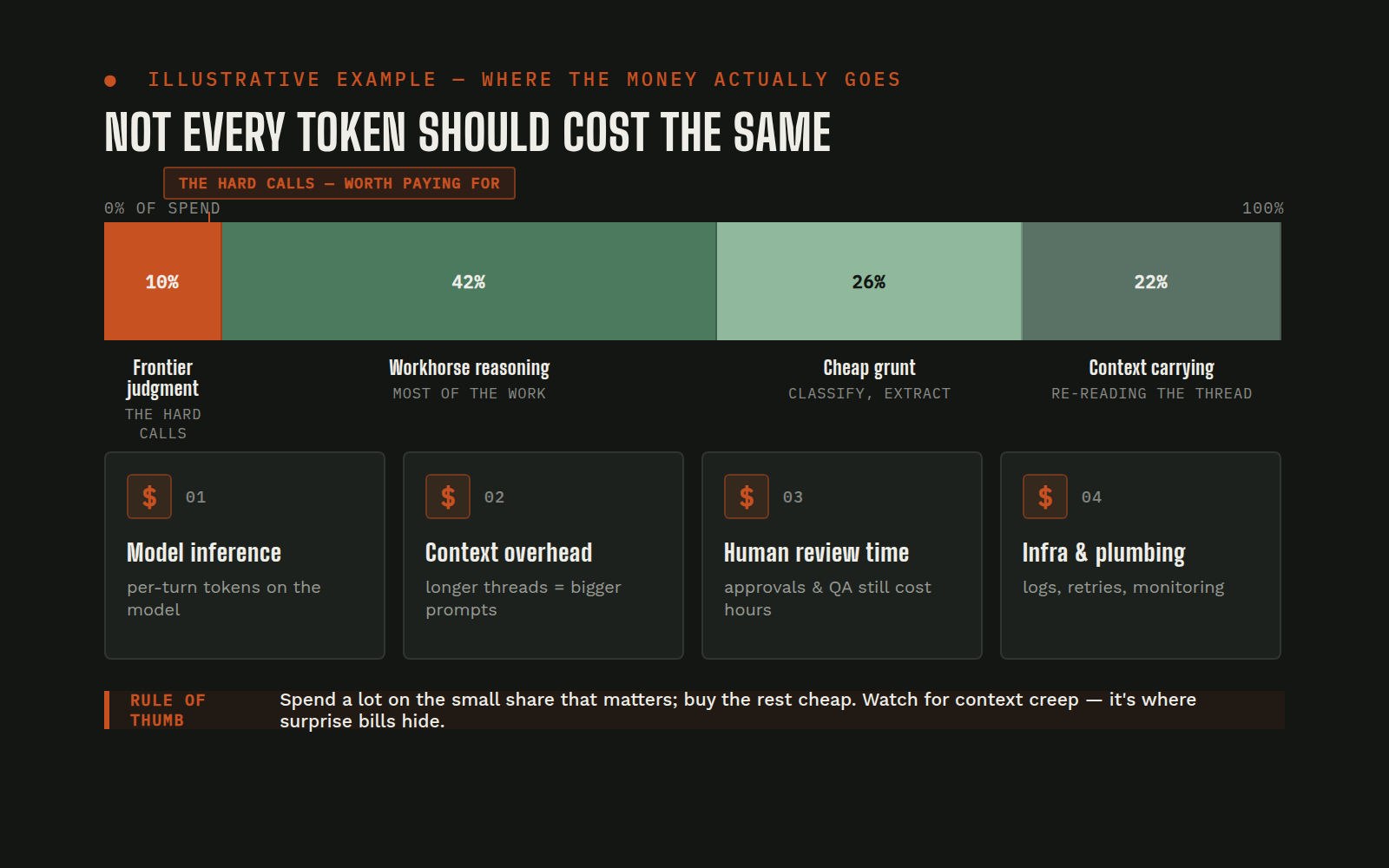
AI work is metered, like electricity. Models charge by the token: a small chunk of text, roughly three-quarters of a word. Every word the AI reads and every word it writes burns tokens. A quick answer to a short question costs a trickle; reading a 40-page contract and drafting a response costs more. You pay for work done, not seats filled, which is why one shared assistant often beats a stack of per-person subscriptions.
Which brain runs the task is the biggest lever. Frontier models, the newest, most capable "brains", cost many times more per token than smaller ones. Good implementations match the tool to the job: the expensive model handles judgment (strategy, writing that matters, anything ambiguous), while cheaper models handle grunt work (sorting, summarizing, extracting). Running everything on the frontier model is like sending your senior partner to fetch coffee.
Carrying context costs money. Remember the desk of open folders? Every folder on the desk gets re-read, at token prices, each time the agent takes a turn. An agent that drags its whole history into every exchange, or sits in long idle sessions accumulating clutter, quietly burns money. Tidy context management is invisible to you and very visible on the bill.
Optimization is a discipline, not a one-time setting. The durable savings come from habits: right-sizing the model per task, keeping context lean, caching what's already been read instead of re-reading it, and, often overlooked, using plain software for mechanical steps. If a job is "move this file and rename it," a script does it for fractions of a cent; the AI should be spent on the parts that need judgment. Well-run agents even audit their own spending and tighten their own habits. The practical takeaway: ask any provider how they manage model mix and context, not just what the monthly number is. The answer tells you whether costs will drift or hold.
Who's allowed to do what: governance and permissions
Giving an AI access to your business systems raises an obvious question: what stops it from doing something stupid, expensive, or public? The honest answer: the guardrails you build. This is the part of an implementation that deserves the most scrutiny, so here's what good looks like.
Scoped permissions. As covered in the anatomy section, every ability is granted deliberately. The agent gets the minimum access each workflow needs: read-only wherever possible, write access only where the job demands it.
Approval gates. Sensitive actions pause and wait for a human. Anything public (posting to your website or social media), anything financial (payments, refunds, invoices), and anything destructive (deleting data, changing system settings) should require an explicit human yes before it happens. The agent prepares the action; a person pulls the trigger. This "human-in-the-loop" pattern, a person built into the workflow at the moments that matter, is the norm, not the exception, in well-run systems. A related, non-negotiable house rule: nothing goes to a client with unverified claims in it. If the agent can't prove a number, the number doesn't ship.
Credentials stay out of chat. Passwords and access keys are never typed into a conversation with the AI; they live in a locked credential store the agent can use without ever seeing or repeating them. If a vendor's setup process involves pasting a password into a chat window, that's a red flag.
Audit trails. Because the agent works in shared channels and writes its actions into logs and records, there's always an answer to "who did that, and why?" Every action traces back to a request, a rule, or a schedule. Silent action is the enemy; visible work is the norm.
Clear authority lines. Decide up front who can ask the agent for what. Which people can approve spending? Whose instructions win in a conflict? Good implementations encode this rather than leaving it to vibes, including the rule that when two owners disagree, the agent flags the conflict instead of quietly picking a side.
When things break, and they will
Anyone selling you AI that "just works" forever is selling something else too. Here's the honest version.
Agents crash. Models get updated by their makers and behave slightly differently afterward. A connected system changes its rules, and a connection that worked for months suddenly doesn't. The technology is moving faster than anything business software has seen, which is exactly why it's valuable, and exactly why maintenance is not optional. An AI implementation is closer to hiring than to buying a toaster: it needs onboarding, management, and ongoing attention.
What separates a reliable operation from a fragile one is not avoiding failures; it's making failures cheap. The practices that do it:
- Everything important is written down. State files (a written record of where every project stands) and memory files mean a crashed agent can restart and pick up where it left off, losing nothing. If it only exists in a chat window, it can be lost; if it's in a file, it survives.
- Watchdogs and monitoring. Automated sentries watch the agents, checking that scheduled work ran, costs are in range, connections are alive, so a quiet failure gets caught in hours, not discovered in next month's numbers.
- Verification gates. Nothing ships on the agent's say-so. Changes are checked against the live result, the actual website, the actual data, before "done" is claimed.
- Backups and rollback paths. Before anything risky, a copy of the current state is saved, so any change can be undone.
- Playbooks that capture lessons. When something breaks, the fix becomes part of a skill, so the same failure doesn't get rediscovered six months later.
One more plain truth: the machinery under all of this is real server infrastructure: the kind managed through Linux and a command-line terminal (the text-only control panel professionals use to run servers). If your team is comfortable there, much of this is learnable. If they're not, this is where a professional partner comes in. There's no shame in it: you don't service your own elevator either.
Where your data goes
The first question careful owners ask, and the right one. Three things to understand:
What the AI can see is up to you. The agent sees exactly the systems you've connected and the permissions you've granted, nothing more. Least-privilege access (granting the minimum each job needs) isn't just a safety practice; it's a privacy one.
What leaves your walls. When an agent uses a model, the text it's working on is sent to the model provider (Anthropic, OpenAI, Google) for processing. Business-grade access to these providers comes with contractual commitments that your data isn't used to train their models, a meaningfully different arrangement from free consumer chatbots, where data-use terms are looser. Which tier you're on is worth confirming, not assuming.
Data protection habits still apply. Sensitive records deserve the same discipline they'd get anywhere: access limited to those who need it, retention rules, and a clear answer to "can we purge this if a client asks?" A good implementation partner will raise these questions before you do.
What AI gets wrong
Models have a well-documented flaw called hallucination: when an AI doesn't know something, it can produce a confident, fluent, wrong answer: invented statistics, imaginary case law, a plausible-sounding policy that doesn't exist. It isn't lying, exactly; it's completing a pattern without knowing it left the truth behind.
You don't fix this with hope. You fix it with verification: agents required to pull numbers from real systems instead of memory, check their work against the live result, and label anything unverified as exactly that. It's also why approval gates put a human between the AI and anything public or financial. The rule of thumb for owners: trust the workflow, not the sentence. A well-built workflow earns trust by proving its claims; a raw chatbot answer, however confident, is a draft.
A pocket glossary
- Model
- the AI "brain" (Claude, GPT, Gemini); the engine that reads, reasons, and writes.
- Token
- the metering unit of AI work; a chunk of text about three-quarters of a word. You pay per token read and written.
- Context
- what the AI can see right now; its desk of open folders. Finite, and it costs to carry.
- Prompt
- the request you send the AI; the term for "what you typed."
- Agent
- an AI with a job: tools, instructions, and memory, doing work rather than just answering.
- MCP (Model Context Protocol)
- the standard plug that lets an AI use another system's controls.
- API
- a service's official connection point for other software; the direct lines programs use to talk to each other.
- Hallucination
- when AI confidently makes something up; the reason verification is built into serious workflows.
Your first 90 days
What a rollout actually looks like, no science fiction, just sequence:
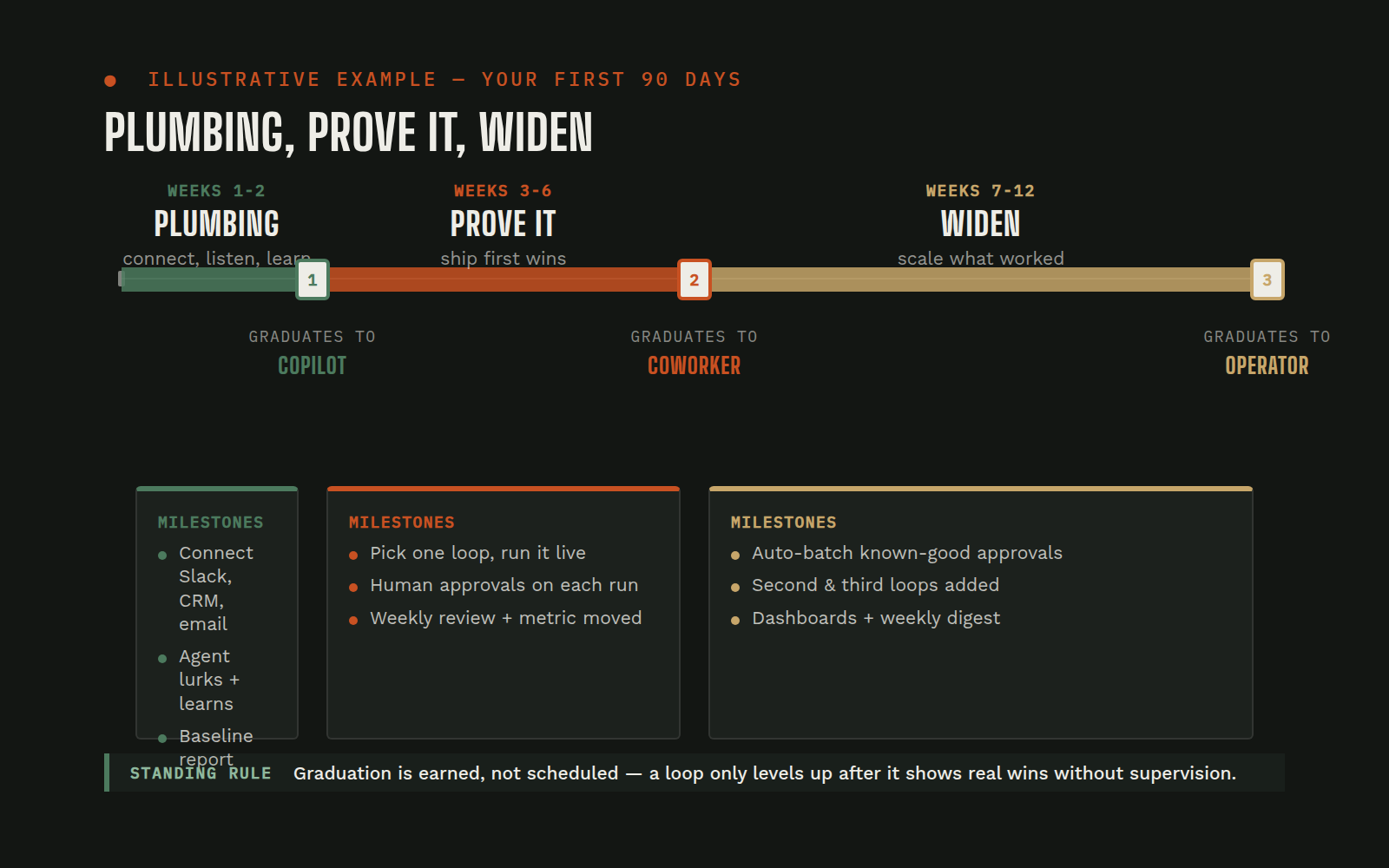
Weeks 1–2: Plumbing and one workflow. The assistant is deployed into your Slack or Teams, connected to your first systems, and pointed at one painful, well-defined workflow, not ten. Governance rules are set on day one: what it may touch, what needs approval.
Weeks 3–6: Prove it, then trust it. The team uses the first workflow daily. The agent's instructions and skills get tuned by real use: every correction makes it more yours. You start at Copilot; nothing graduates to Coworker until it's earned it.
Weeks 7–12: Widen deliberately. More systems connected, more workflows added, the first Operator-level process turned on where the rules are crisp. Costs are reviewed against actual usage, and by now you know, from your own experience, not a sales deck, what the next quarter should automate.
The theme: start narrow, verify everything, expand on evidence. It's the same discipline the rest of this guide keeps preaching, applied to the rollout itself.
Questions this guide didn't answer? That's what the conversation below is for: tell us what your business runs on, and we'll tell you what's possible.